

Most websites are built for people to click through, and AI is added later through plugins and admin panels. Here an AI agent, run through a platform like Claude Code or Codex, builds the whole site as plain code it can read and change, then runs it for you from the terminal. Voidwright's own site, voidwright.io, was built with earlier, site-specific editions of these harnesses.
Human responsibility: You answer the setup questions, type your own passwords and keys, set spending limits, and approve previews, wording and releases. Finished content for a content library goes live through a rebuild without a further sign-off.
- Bring
- Your computer (Linux or macOS, or WSL2 on Windows), git, Python 3, about an hour, and an AI agent run through a platform like Claude Code or Codex. Which agents are tested is under Terms & limits.
- Leave with
- A local memory brain with 1,666 web-craft memories, 18 skills and three automation harnesses (packaged workflows for whole jobs), each with a separate AI reviewer. Your agent is then designed to build an Astro site, check it and send you a preview link; this packaged copy's site-building steps have not yet been run end to end by a new user.
- Why it matters
- Every part of the site is plain code the agent can read and change, so you grow the site by describing what you want. A lesson learned on one page is remembered on the next.
What makes this a system?
01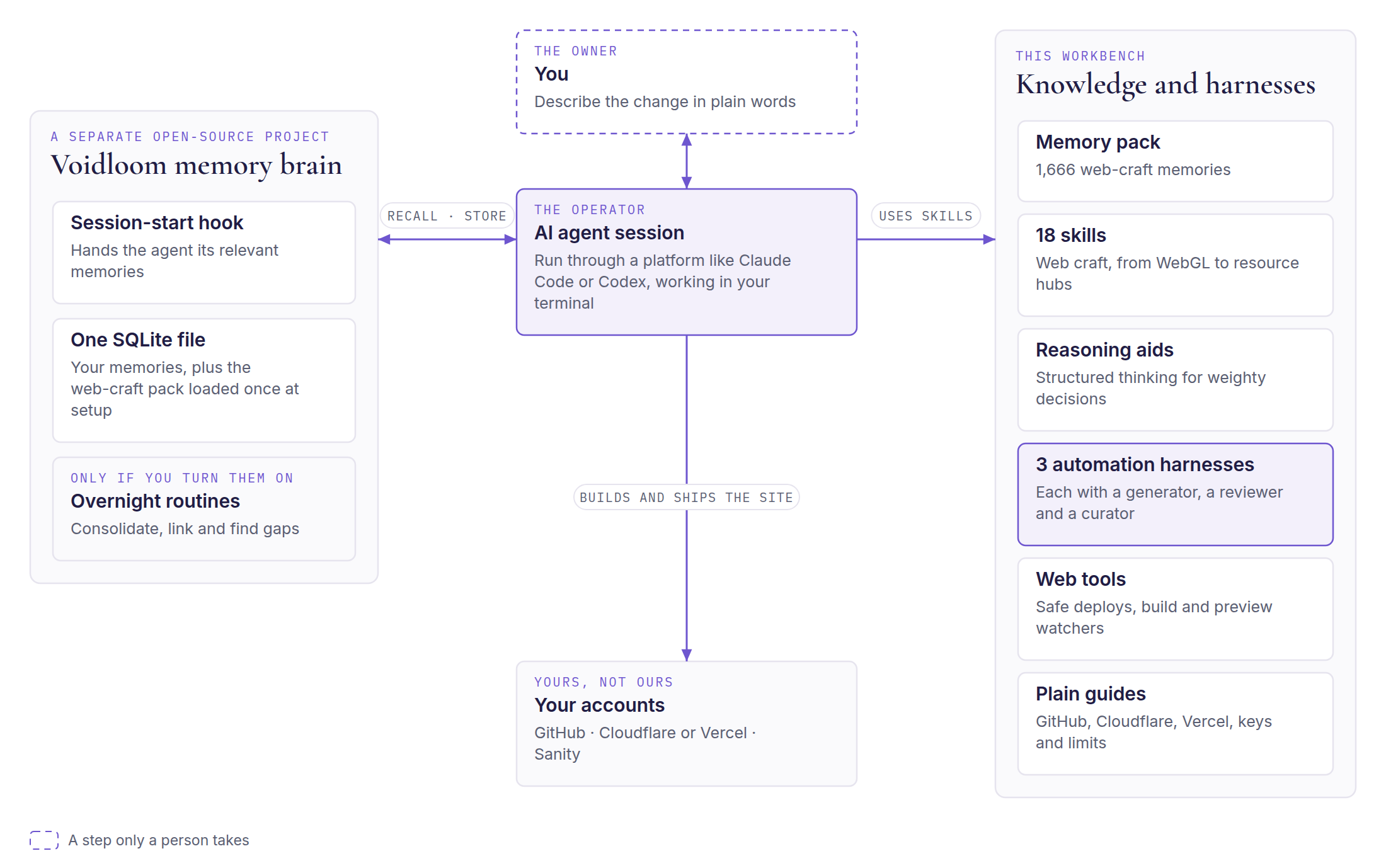
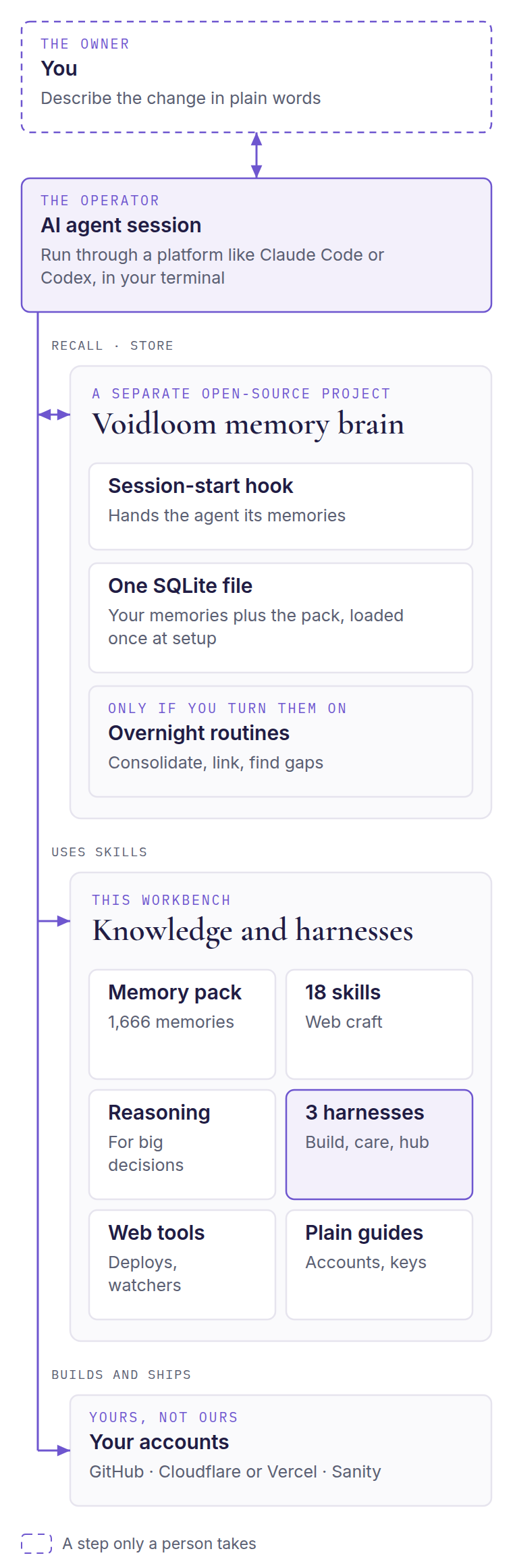
The usual arrangement gives an AI assistant a narrow window into a site built for people. Here the agent holds every lever: the code, the pages, the content, the deploys and the hosting settings. Astro is what makes that practical. In an Astro site every page, component, style token and route is plain code in a git repository. The agent can read it, change it, test it and deploy it, with no database-driven admin screen in between. Around the agent sit a memory brain, knowledge in the form of skills and memories, three automation harnesses that run whole jobs, and the accounts you own.
Your AI agent, Operator
The AI model working in your terminal, run through a platform like Claude Code or Codex. It reads the guides, runs the commands, edits the site and reports back. Which agents are tested is under Terms & limits.
Why it exists: The workbench is instructions, memories and tools. An agent is what acts on them.
Authority: It works only on your computer and the accounts you connect, and it stops at every step the guides mark as yours. Setup places the skills, commands and review agents in Claude Code's folders under ~/.claude; the persona forge, the /inner-council command and the review-loop agents are Claude Code features.
Your Astro website, Your files
The site itself: pages, components, style tokens and routes kept as plain code in a private git repository and built into fast static HTML. When the site needs a content library, resources can come from a headless content store (Sanity).
Why it exists: With no admin screen between the agent and the site, every change is something the agent can make, test and deploy.
Authority: The repository and the hosting accounts are yours. The main branch is production; every other branch is a preview.
Voidloom, the memory brain, Memory
A local memory system for AI agents: a command-line tool, a session-start hook and one SQLite file. The agent stores lessons, decisions and fixes as it works and recalls them later. Described plainly, it works like retrieval-augmented generation (RAG): it finds the stored memories that match the task and puts them in front of the agent. On the semantic tier that search uses vectors and keywords together; a keyword-only brain uses keywords alone. Over time, the computer's knowledge grows. Optional overnight routines can consolidate memories, link related ones and propose improvements.
Why it exists: Without memory, every session starts from zero. With it, a fix learned on one page is applied on the next.
Authority: Memory informs the agent; it does not decide. A recalled lesson is a strong hint, and the code and the live site decide. Setup clones Voidloom from its own public repository (github.com/void-wright/voidloom) at a pinned, tested commit; it is not copied into the workbench.
The web-craft pack, Memory
1,666 memories of general web craft in 34 clusters, from Astro builds and deploys to accessibility, security headers, forms, testing and review loops. It is loaded into the brain once at setup.
Why it exists: A new brain knows nothing about building websites. The pack means the agent starts out knowing how modern sites are built, checked and deployed.
Authority: It holds craft lessons, not anyone's project history. A second load adds nothing, a newer pack replaces changed memories in place, and your own memories are left untouched.
18 skills, Knowledge
Knowledge the agent reaches for while it works. The set covers a WebGL craft cluster (a router plus five skills), Astro page creation, web-app building, prototype sites, scroll-driven journey pages, answer-engine optimization, agent readiness, resource libraries, URL slug design and corporate graphic design. Three more are reasoning layers written for the harnesses.
Why it exists: Specialist guidance is loaded only when a task needs it, rather than crowding every session.
Authority: Skills are reference material. They advise; they do not act or approve anything.
Three automation harnesses, Workflows
Each harness wraps the agent for a whole job with a persona, a step-by-step guide, a skillbook, a memory map and a review loop. The personas have names, but they are names for AI roles, not people you will deal with. First build (an AI role named Dr. Merry Backus) takes a design handoff to a private preview. Website maintenance (Dr. Cassian Holt) looks after a live site. Resource hub (Dr. Wren Alcott) runs a content library on Astro and Sanity.
Why it exists: A complete job, from first request to verified deploy, needs a consistent working discipline that one chat prompt cannot carry.
Authority: The harnesses hand work to each other: a first build registers the new site with website maintenance, and with the resource hub too when the build includes a hub. Each harness stops at its human pause points, such as sign-ins, a domain change at the registrar, or your sign-off.
The review loop, AI roles
Three AI roles work in turn. A generator builds the change inside a confined workspace. A reviewer, which is read-only and never fixes, scores five dimensions (completeness, correctness, quality, convention adherence and use of the skillbook) out of 10 each and runs real browser checks; close to the pass mark, a second reviewer joins and both must recommend acceptance. A curator records what was learned in the harness's skillbook after every pass.
Why it exists: A builder misses its own blind spots. Separating the maker from the judge catches small regressions before they pile up. The reviewer is a separate AI role, not a person or an outside auditor.
Authority: Each harness's guide sets its bar, shown in one table under The harnesses, and passes it to the reviewer in place of the reviewer's built-in default of 8.
Reasoning aids, Knowledge
The Inner Council, called with /inner-council, brings four voices to a weighty decision. Orin names what is known and assumed, Vael pushes back, Dessa checks how the pieces fit and Kael-Em looks for the bolder option. Planning cognition is a light reasoning layer for plans, designs and critiques.
Why it exists: Expensive, hard-to-reverse choices deserve more than one line of thought.
Authority: The voices advise. Your own persona chairs the council and decides.
Web tools and nexus tools, Tools
Small helpers for Cloudflare API calls, safe deploys, build and preview watchers, and form-submission checks. One more, the nexus tool, keeps an index memory in the brain up to date: a single memory that tells the agent which topic to recall for which need.
Why it exists: They give the agent safe, repeatable ways to reach your accounts and to prove a deploy really happened.
Authority: They read your one private key file without running it and never print a key's value. The deploy wrapper refuses to act when a project is pinned to a different account.
Plain guides, Guides
Assume-nothing guides for GitHub, Cloudflare, Vercel, choosing a host, and outside services, keys and spending limits.
Why it exists: The steps that need a person, such as creating accounts and setting limits, should be written for someone who has never done them.
Authority: No keys are required. Every paid service has a manual route: the agent writes the settings into a handoff file, and you complete the step on the vendor's website.
You, Person
The site's owner and the person the agent works for.
Why it exists: Some steps should never be delegated: anything that proves who you are, spends money or publishes in your name.
Authority: You answer the setup questions, type passwords and keys in your own terminal, sign in through your browser and set spending limits. You also design your persona in the persona forge, a short guided step that sets your agent's working voice. You approve previews and wording, change domain settings at your registrar and decide what goes to production.
The three automation harnesses
02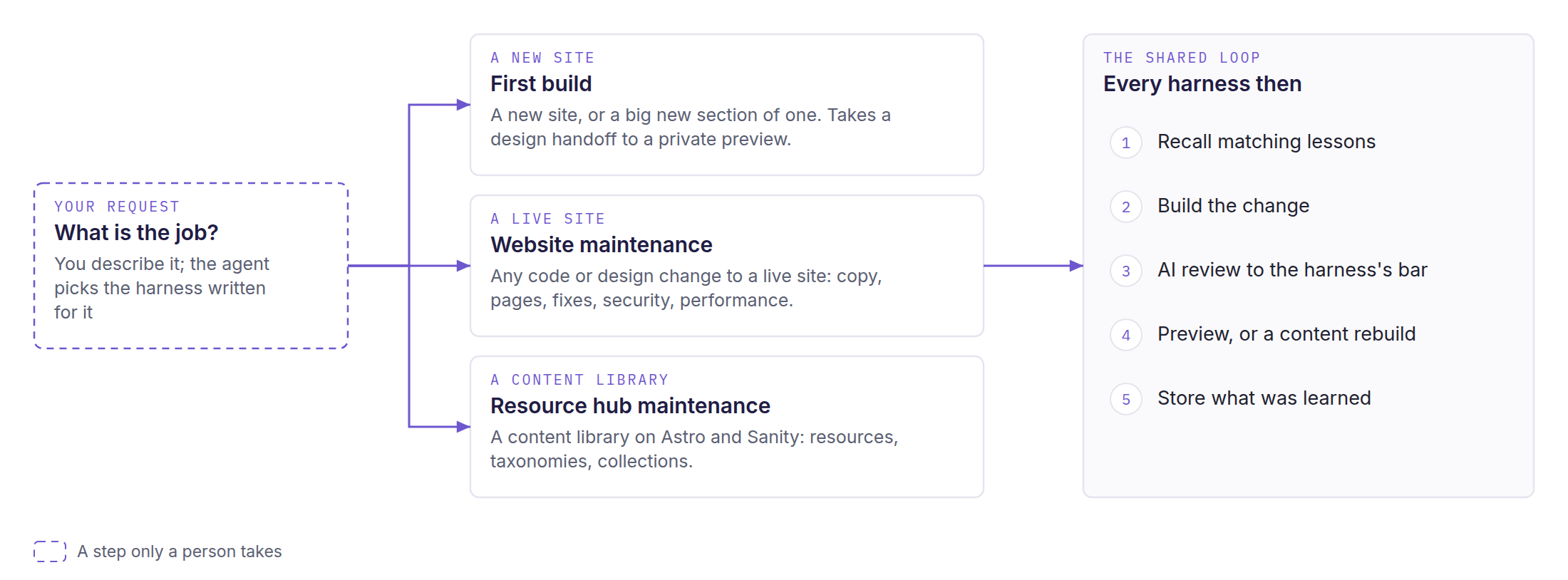
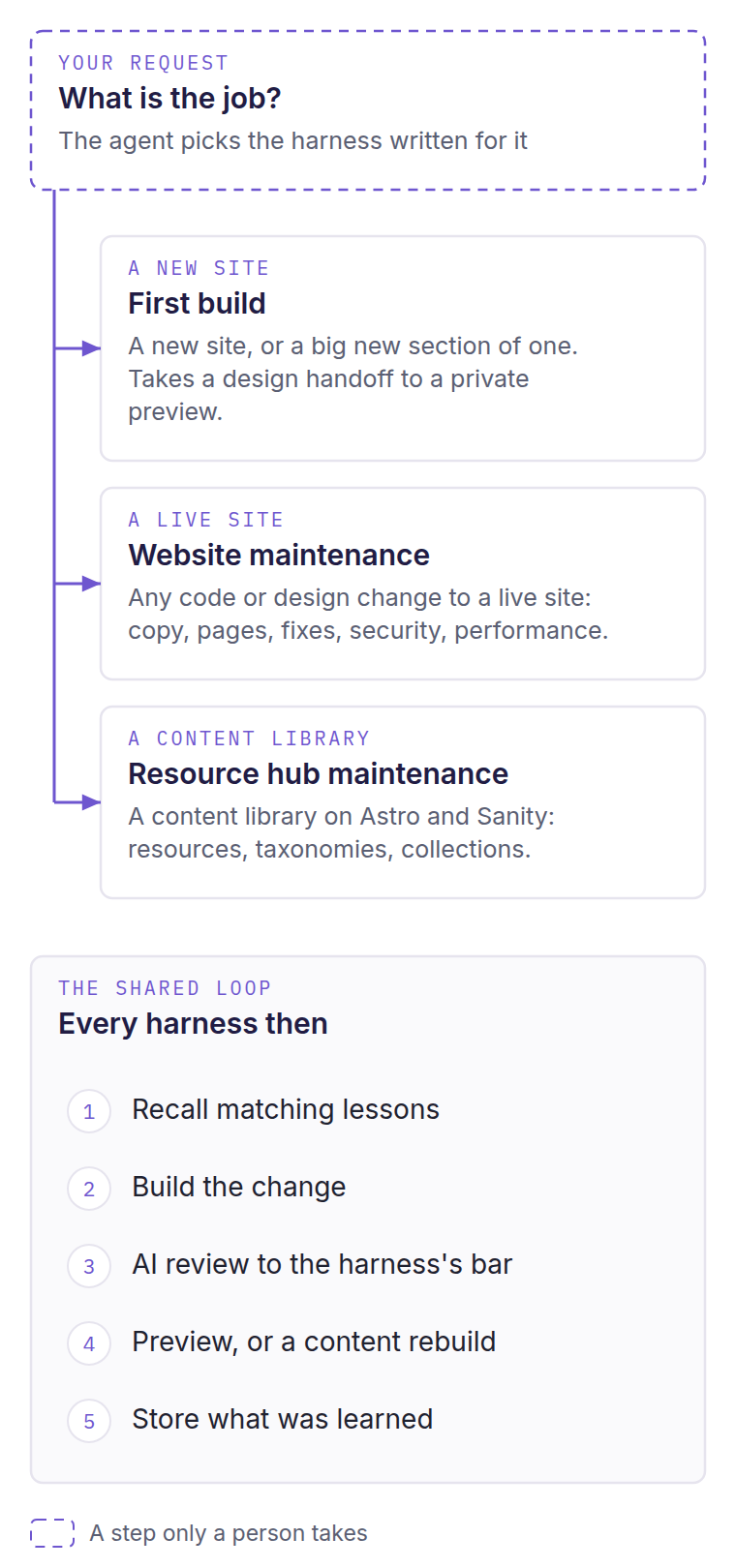
Each harness is a packaged workflow that runs one kind of job from start to finish, with its own guide, its skillbook and a review loop. The agent picks the harness written for the job; choose a tab to follow its steps.
First build
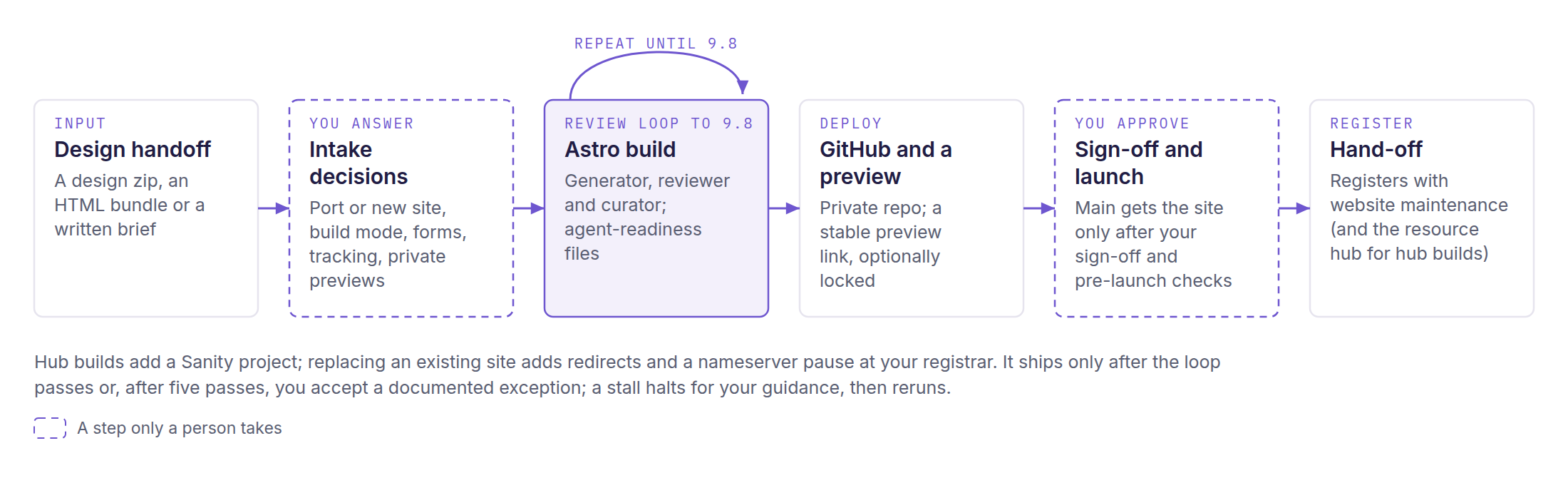
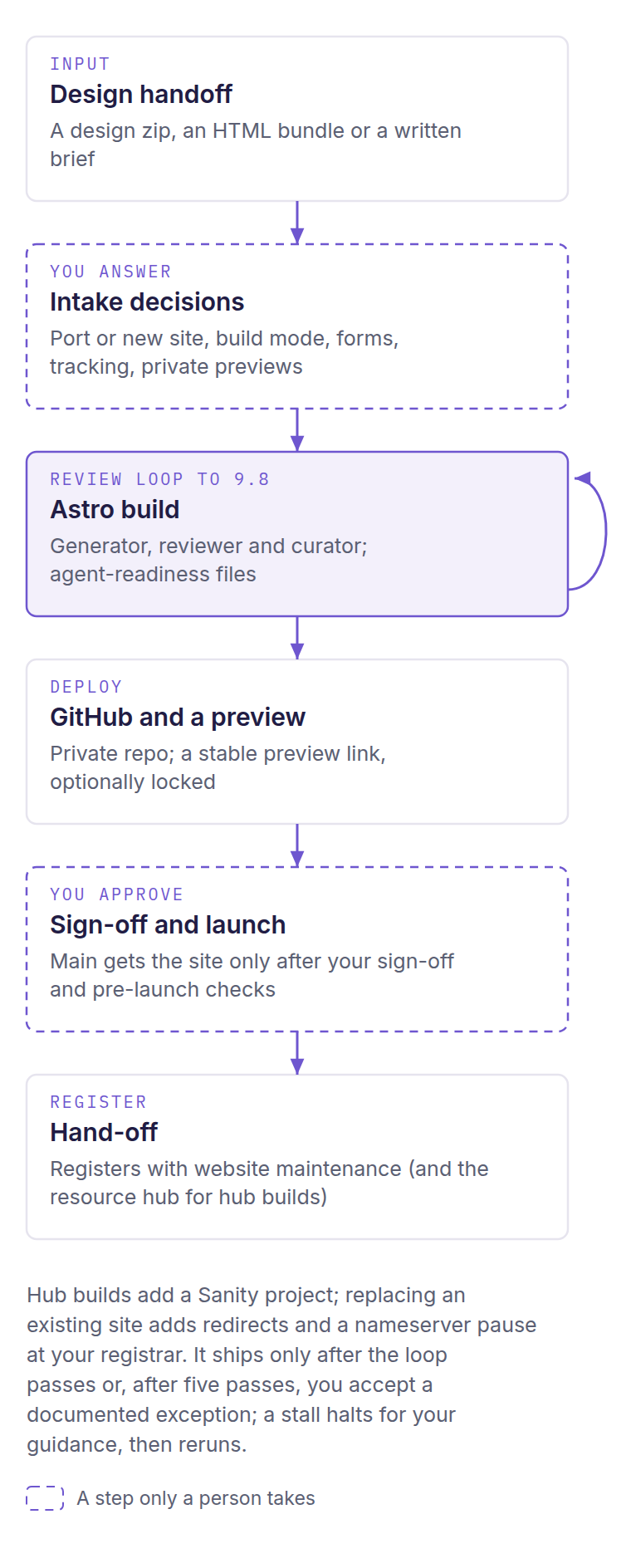
For a new site, or a big new section of a live one. It takes a design handoff to a private preview and launches only after your sign-off. The AI role that runs it is named Dr. Merry Backus.
Startup and recall
The agent reads the harness guide, takes on its persona and runs the startup recall. It states what it recalled before any work starts.
- Who acts
- The agent
- Who approves
- No approval at this step
- Check
- Recalled lessons are stated before work begins
Port or new site, and build mode
It asks whether the domain already has published pages people link to, which makes the job a port. Then it picks website only, resource hub only, or both.
- Who acts
- The agent asks
- Who approves
- You answer
- Check
- Both decisions recorded
Read the design handoff
It unzips the handoff outside the repository, hashes every asset and lists the design tokens. A missing asset halts the build; nothing is invented.
- Who acts
- The agent
- Who approves
- You supply anything missing
- Check
- Every referenced asset is present
Names, forms and tracking
It confirms the repository, Worker and preview-branch names, then asks where form submissions go, what is gated and whether to track visitors. The proposed default is no cookies and no banner.
- Who acts
- The agent asks
- Who approves
- You decide
- Check
- Answers recorded before any page is generated
A content store for hubs
Hub builds get a Sanity project in your own organization, with four document types. A website-only build skips this step.
- Who acts
- The agent
- Who approves
- You own the Sanity account
- Check
- Studio loads and a test query returns documents
Build in the review loop
A generator builds the Astro site. A read-only reviewer scores it, runs axe on every route and Lighthouse on the built site, and a curator updates the skillbook after every pass.
- Who acts
- Generator, reviewer and curator (AI roles)
- Who approves
- No person; the loop ends by the reviewer's rule
- Check
- The harness's bar (see the table above)
When the loop does not pass
After five passes you choose: accept a documented exception (never labeled as passing), give more guidance, or revisit the handoff. A stall halts for your guidance or a new skillbook strategy, then reruns.
- Who acts
- The harness halts
- Who approves
- You
- Check
- An exception is written down and never marked as passing
Private repository and preview
It creates a private GitHub repository with a secret-scanning hook, connects Cloudflare Workers or Vercel, and sends you the stable preview link.
- Who acts
- The agent; the account holder does dashboard-only steps
- Who approves
- You, for dashboard steps
- Check
- If previews are locked, a visitor without credentials is turned away and the service token loads the page
Ports only: redirects and the domain switch
When the build replaces an existing site, it prepares redirects and stops while you change the nameservers at your registrar.
- Who acts
- You, at your registrar
- Who approves
- You
- Check
- Every redirect check passes on the preview before launch is requested
Launch and hand-off
The site reaches main only after your sign-off and the pre-launch checks. The harness then registers it with website maintenance, and with the resource hub when the build includes one.
- Who acts
- The agent
- Who approves
- You sign off the launch
- Check
- The pre-live gate passes and the registry entries are written
Website maintenance
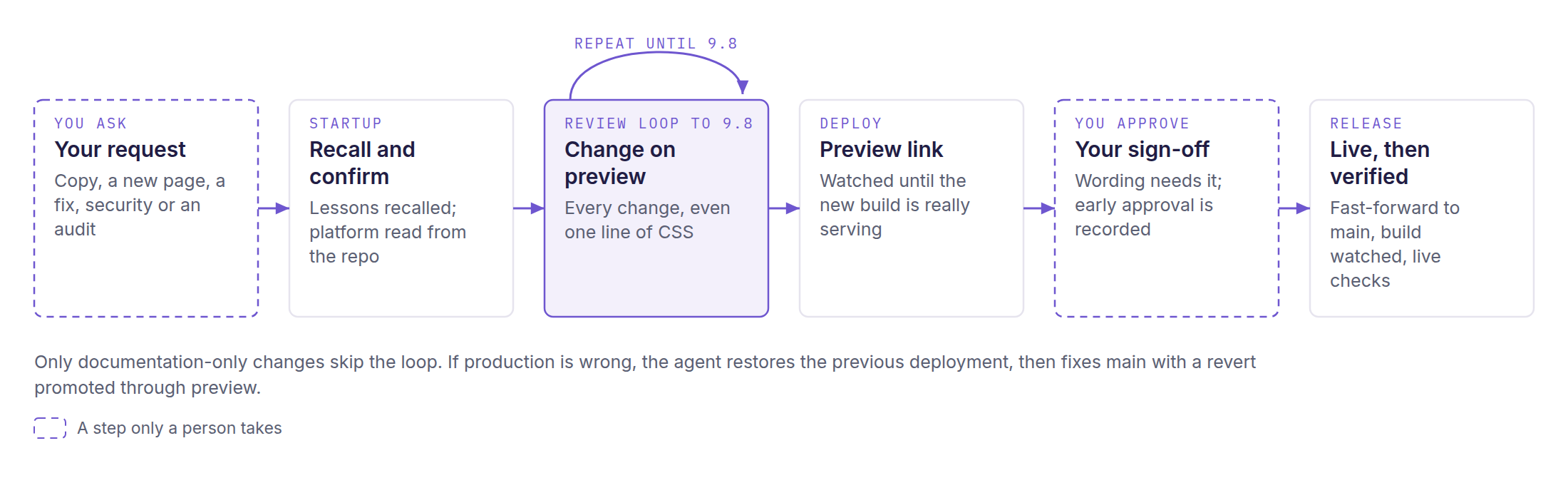
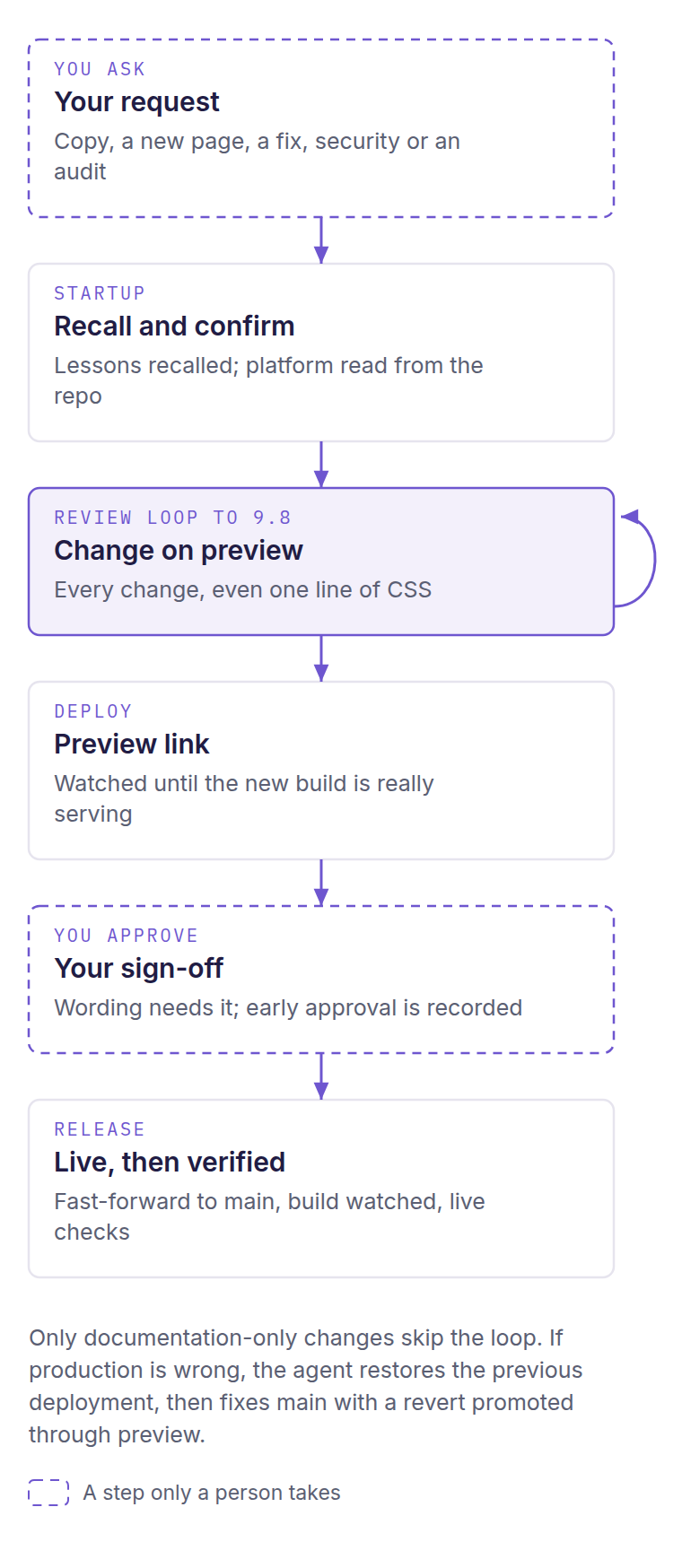
For any code or design change to a live site, from one line of CSS to a security update; content-library work in Sanity belongs to the resource hub harness. Every change except documentation-only edits is reviewed, then waits for your sign-off on a preview. The AI role that runs it is named Dr. Cassian Holt.
Startup and recall
The agent reads the guide, the skillbook and the site's registry entry, runs its recall and checks tool versions. It confirms the hosting platform from the repository itself.
- Who acts
- The agent
- Who approves
- No approval at this step
- Check
- Platform confirmed from the repository; versions in sync or listed
Name the job
The change is sorted into a workflow: a copy or design tweak, a new page, a bug fix, a security update or an audit.
- Who acts
- The agent
- Who approves
- You describe the change
- Check
- The matching workflow is chosen
Change on a preview branch
A generator makes the change in an isolated workspace on the preview branch or a feature branch, never on main.
- Who acts
- Generator (AI role)
- Who approves
- No approval at this step
- Check
- Nothing is pushed to main
Review every change
A read-only reviewer scores five dimensions and runs Lighthouse and axe on the touched pages; a curator updates the skillbook after every pass. Only documentation-only changes skip this.
- Who acts
- Reviewer and curator (AI roles)
- Who approves
- No person; the loop ends by the reviewer's rule
- Check
- The harness's bar (see the table above)
Push and watch the preview
The agent pushes the branch and waits until a marker unique to the new build is actually serving.
- Who acts
- The agent
- Who approves
- No approval at this step
- Check
- The new build's marker appears on the stable preview link
Your sign-off
You get the stable preview link with a one-line summary. Changes to wording need your explicit sign-off; if you approve the preview before the loop or Lighthouse checks finish, the agent records what ran and what did not and closes the rest after deployment.
- Who acts
- You
- Who approves
- You
- Check
- The sign-off and the reviewed commit are recorded
Rehearse production
A clean copy of the repository is built the way the host will build it, with production settings, before anything is merged.
- Who acts
- The agent
- Who approves
- No approval at this step
- Check
- The clean-copy build succeeds
Promote, fast-forward only
After an ancestry check, the reviewed commit is fast-forwarded from preview to main, never forced. The production build is watched by its build ID.
- Who acts
- The agent, on your recorded sign-off (the guide's boundary table names you as the owner of the merge)
- Who approves
- Your earlier sign-off
- Check
- The deployment ID is recorded
Verify live, or roll back
Live headers, links and agent-readable files are checked on the real domain. If production is wrong, the agent restores the previous deployment, and the fix to main goes back through preview and your sign-off.
- Who acts
- The agent restores the deployment
- Who approves
- You sign off the fix
- Check
- The live site matches the reviewed preview
Store what was learned
The run closes by updating reusable lessons and recall phrases, and by writing down any open items.
- Who acts
- The agent
- Who approves
- No approval at this step
- Check
- Each lesson is stored on its own
Resource hub maintenance
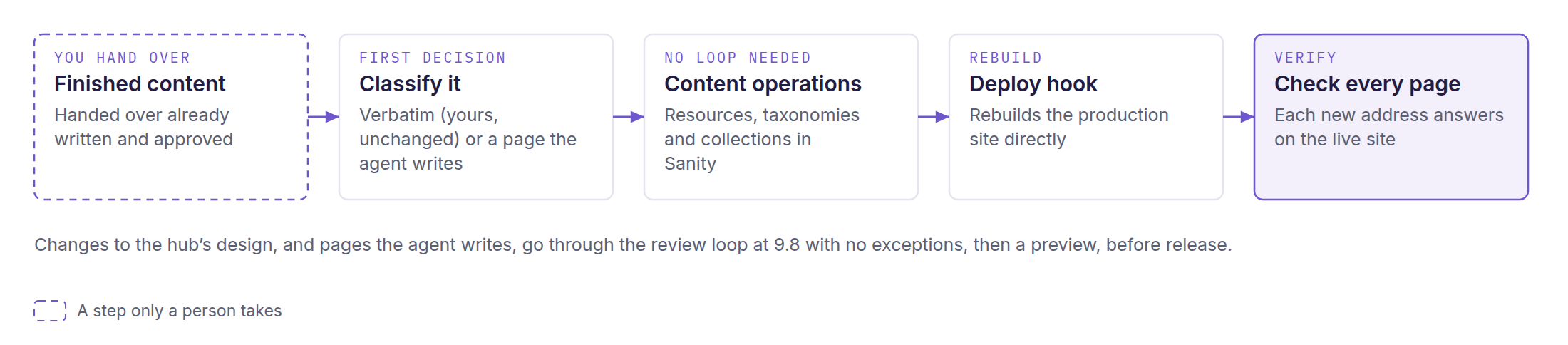
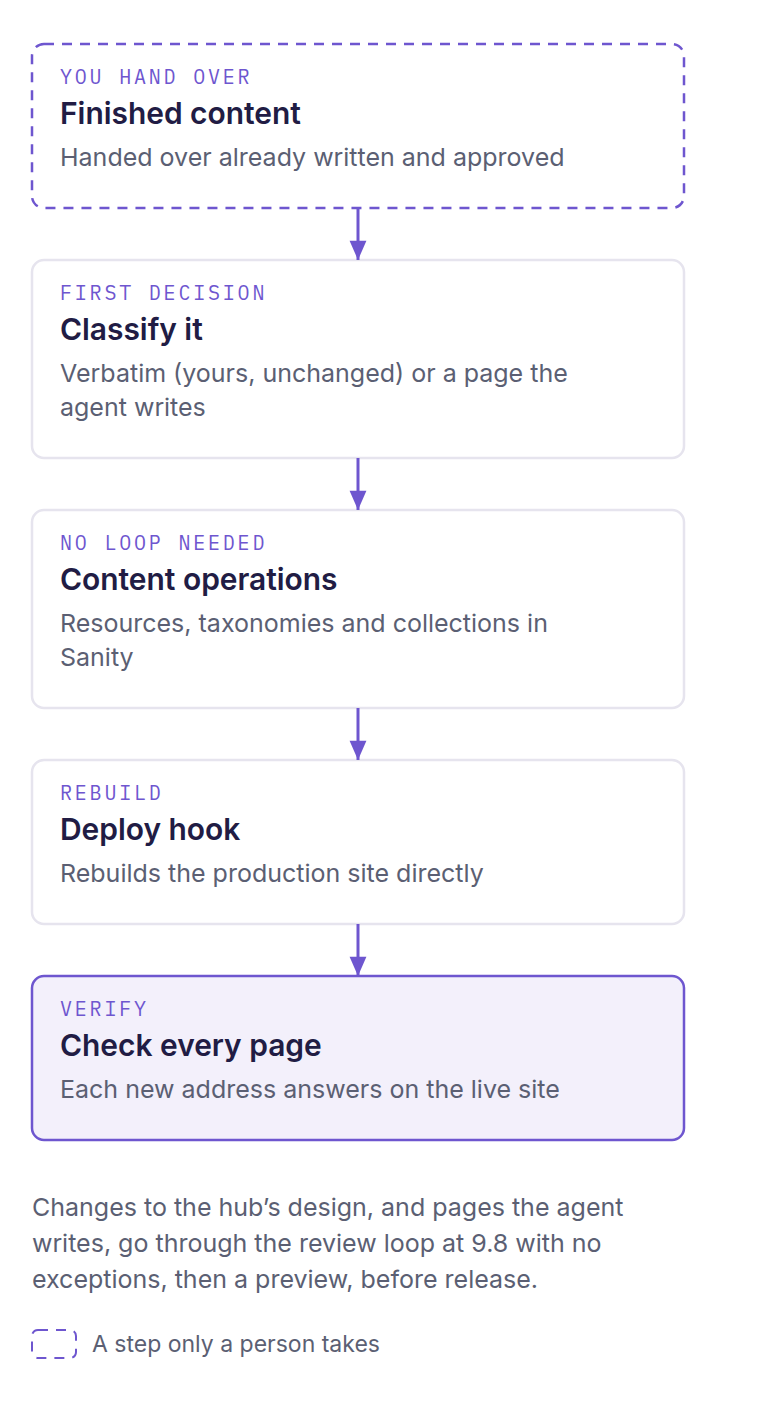
For a content library on Astro and Sanity. Finished content goes in word for word and goes live through a rebuild; design changes and pages the agent writes go through the review loop. The AI role that runs it is named Dr. Wren Alcott.
Startup and recall
The agent reads the guide, takes on the resource hub's working persona, checks the site's registry entry and runs its recall and version checks.
- Who acts
- The agent
- Who approves
- No approval at this step
- Check
- Recalled lessons are stated before work begins
Classify the content
The first decision on every page: did the owner already write and publish this and hand it over finished? If yes, it is verbatim; if no, the agent writes it. When unsure, the agent asks you.
- Who acts
- The agent
- Who approves
- You, when it is unclear
- Check
- The classification is recorded before any page is built
Verbatim pages stay word for word
Finished content is extracted by a program, not rewritten by a model, then checked line by line against the original.
- Who acts
- The agent's tools
- Who approves
- No approval needed; the words are already yours
- Check
- The text check finds no differences
Add resources
Resources are prepared with stable IDs and slugs, dry-run first, then written in one atomic update and read back.
- Who acts
- The agent
- Who approves
- You, by handing over finished, approved content
- Check
- Counts match, no orphan tags, every card links somewhere
Taxonomies, collections and series
Tags, collections and imported article series are content operations with predictable results, so they skip the review loop.
- Who acts
- The agent
- Who approves
- No separate sign-off
- Check
- Read-back counts match
Rebuild the site
A content-only change triggers a deploy hook that rebuilds the production site directly. A code change goes on a preview branch and merges after review.
- Who acts
- The agent
- Who approves
- For code changes, the review and merge rules apply
- Check
- A string unique to the new build is live
Check the live library
Scripted browser checks at three widths confirm cards, filters, search and images, and every new address must answer on the live site.
- Who acts
- The agent
- Who approves
- No approval at this step
- Check
- Every shipped page returns 200
Design changes and written pages
Changes to the hub's design, and pages the agent writes, go through the review loop, with each page reviewed on its own. The bar has no exceptions: 9.8 overall, and 9.8 in every dimension for pages built in batches.
- Who acts
- Generator, reviewer and curator (AI roles)
- Who approves
- No person; the loop ends by the reviewer's rule
- Check
- The harness's bar (see the table above)
Gating and tracking only on request
Gated downloads are off by default. If you want them, the form flow fails closed; if tracking is added, consent controls come first.
- Who acts
- The agent
- Who approves
- You decide
- Check
- A failed form never reaches the download
Store what was learned
The run closes by updating reusable lessons, recall phrases and open items.
- Who acts
- The agent
- Who approves
- No approval at this step
- Check
- Each lesson is stored on its own
A real example: how one page of voidwright.io was built
03voidwright.io, the studio's own Astro site, was built with earlier, site-specific editions of these harnesses. Here is the real record of its Voidloom page in order: three designs, two of them reshaped by Andrew's decisions. Select an image to see each design and what decided it.
What this is: Real records and files from voidwright.io's own build, not an invented scenario
The first design, reviewed
An earlier design, dark painted plates with a constellation figure, went through a first-build loop run by the AI role Dr. Merry Backus. Its first three passes scored 8.84, 9.28 and 9.60 and reached the run's three-pass cap with every automated gate green, below the 9.8 bar. After Andrew's changes, two more passes scored 9.14 and 9.26, and he approved the page. The first design stayed on the preview branch; it never reached production.
The second design, a tapestry
Andrew's notes moved the page to a single tapestry painting. Two rounds were checked by automated gates (build, security policy, contrast and reading without script), and no reviewer score was kept. The second design reached the main branch, and so production, in the same push as the site's launch settings.
The third design, a scroll journey
A new board and four new paintings rebuilt the page as a four-stop journey, each stop naming its painting, side and words (the peak also its hold). It went live on Andrew's ruling “good enough, tweaks later,” with no review score and its Lighthouse, axe, live-page and real-phone checks recorded as still owed.
How this record compares with the packaged rules
It ran under an earlier, site-specific edition of the first-build harness, which capped the loop at three passes and left the decision to Andrew at the cap. In this packaged edition, his approval of the first design would correspond to a documented exception after five passes (no such exception record was written at the time). No harness record governs the third design's release. It was run as a video-production board: the separate video automation's storyboard for scroll-driven pages, run by its AI producer role, Dr. Soren Aldwin. It was released on Andrew's ruling. In this packaged edition, the nearest rule is website maintenance's early approval. It lets you approve a preview before its review loop or Lighthouse checks finish, as long as the unrun checks are recorded, as the build's status notes did.
From the first reviewed build to the live page: 20 days
What this does not establish: These records come from voidwright.io's own build with the site-specific editions of the harnesses, not from this packaged copy. The scores apply to the first design only; no review score applies to the page as it looks today, and the journey's browser checks were still owed when it went live.
Read the complete source text
STYLE: a loose, luminous watercolour painting on bright white paper: wet-in-wet violet washes, soft blooms and back-runs, granulating pigment, feathered edges, nothing sharp, nothing drawn in line. It is an ABSTRACT COSMIC LANDSCAPE rendered in watercolour, at the scale of a vast landscape painting: we are inside a great calm astral sea, looking across it into deep distance. Wide sweeping bands of violet and lilac nebula wash stretch across the whole width of the painting in layers (near, middle, far), with soft cloud banks, depth and atmosphere, made only of nebular washes, soft clouds of pigment, tiny soft points of light like stars, and faint threads of light joining some of them into small constellations. Match ONLY the paper, the palette and the brushwork of the reference image, none of its subject.
PALETTE (exclusive): arcane violet #6E56CF, pale lilac #CFC6F5, violet tint #F3F0FB, a faint indigo #211C44 only in the deepest accents of the nebula, and at most one or two tiny pale gold gleams #C8A24A; on white #FFFFFF paper; no other hues.
ABSTRACTION (hard): every form is made only of washes, mist, nebula and soft light, suggested rather than drawn. NO objects of any kind: NO cups, NO bowls, NO vessels, NO jars, NO lamps, NO candles, NO flames, NO leaves, NO plants, NO flowers, NO paper sheets, NO books, NO stone, NO buildings, NO architecture, NO furniture, NO tables, NO ground, NO shadows cast on a surface. Shapes read only by value and colour, the way nebulae and star clusters do.
PAPER (hard): this is still watercolour on white paper: the paper shows through as pure bright white wherever the wash is thin; the TOP and BOTTOM edges of the image dissolve into bare white paper; the washes may run off the left and right edges; no grey or cream cast on the paper. SCALE (hard): NOT a small object centred on blank paper; the forms are immense, the size of mountain ranges or cloud continents in this sky.
NEGATIVES (hard): NO text, NO letters, NO numbers, NO symbols, NO labels, NO frames, NO borders, NO vignette, NO people, NO hands, NO screens, NO devices, NO grids, NO diagrams, NO planets, NO spiral galaxies, NO black hole, NO faces, NO eyes, NO water, NO reflections.
COMPOSITION: 16:9. SUBJECT: a vast woven field of fine threads of light crosses the middle of the sky in the CENTRE and RIGHT THIRDS, like a great soft tapestry of light laid across the astral sea, its threads crossing and interlacing loosely among lilac washes and star points, as large as a cloud continent. Several fine threads come down into it from the TOP EDGE of the painting, entering from above and descending into the weave: these fine threads are the only marks that touch the top edge, and the washes still fade to bare paper before it. From the weave, one single thread rises up out of the field, glowing brighter than all the others, curving gently upward in the centre third; near its tip it plainly divides into two strands braided around each other: one soft, broad and misty, a blur of lilac light, and one fine, crisp and bright. The eye lands first on that braid, a little above mid-height, just right of the centre of the painting. Far behind everything, a long, level band of pale lilac haze lies across the sky just below mid-height and fades out before it reaches the open left third. Apart from those fine entering threads, every form keeps clear of the top and bottom edges, with bare white paper above and below it. The LEFT THIRD of the painting is open, quiet sky: almost bare white paper with only the faintest lilac wash and a few tiny points of light; no form crosses into it.
Status: The source prompt, unedited
Useful terms and limits
04Definitions and optional depth keep the main explanation short without removing important boundaries.
- AI agent and platform
- An AI agent is a model that works in your terminal: it reads files, runs commands and edits code on your behalf. It runs through a platform such as Claude Code or Codex.
- Terminal
- The text window where you type commands to your computer.
- Astro
- A modern, static-first web framework. Pages, components and styles are plain code files, built into fast static HTML.
- Static HTML
- Web pages built ahead of time and served as finished files, with no database lookup when someone visits.
- Headless content store
- A content database without its own website, such as Sanity, that a site reads from when it builds.
- Git repository and branch
- A repository is a folder whose full change history is tracked. A branch is a separate line of changes inside it.
- Preview and production
- Production is the public site, built from the main branch. A preview is a private copy built from any other branch so changes can be checked first.
- Memory brain
- Voidloom: a local store of an agent's memories in one SQLite file, with a command for storing and recalling them.
- Retrieval-augmented generation (RAG)
- A pattern in which a system first finds the stored information most relevant to the task, then lets the model work with it in view. Here it describes what Voidloom does: it finds the memories that match the task and puts them in front of the agent.
- Recall by meaning
- Finding a memory whose wording differs from your question but whose meaning matches, using vectors (numbers that encode meaning). This is the semantic tier, also called Tier 1. A keyword-only brain (Tier 0) matches words instead and can be upgraded later.
- Pre-seed pack
- A ready-made set of memories loaded into a new brain so it does not start empty. Here: 1,666 memories of web craft.
- Skill
- A folder of guidance the agent loads when a task needs that specialty.
- Automation harness
- A packaged way of running a whole job: a persona, a step-by-step guide, a skillbook, a memory map and a review loop.
- Persona
- A defined working voice and set of habits the agent takes on, either for a harness or as your own default.
- Skillbook
- A harness's list of hard-won rules, updated by the curator after each review pass.
- Review loop
- The generator, reviewer and curator cycle that every harness build goes through. The guides also call it an ACE loop.
- Lighthouse and axe
- Standard browser tools. Lighthouse measures performance, accessibility and search basics; axe finds accessibility defects.
- Answer-engine optimization (AEO)
- Structuring a site so AI search tools can find, quote and cite it.
- llms.txt and agent readiness
- Files and conventions that help AI agents read and use a site, alongside the usual pages for people.
- Session-start hook
- A small program the agent runs when a session begins. Voidloom's hook hands the agent its guidance and relevant memories before your first message.
- AGENTS.md
- A plain instruction file that several agent platforms read at startup. Voidloom writes its guidance there for agents without a hook.
- Key file
- One private file, readable only by you, that holds any service keys you choose to use. Tools read it without running it and never print a value.
- Manual route
- The no-key alternative for each paid service: the agent writes the settings into a handoff file and you complete the step on the vendor's website.
- Spending limit
- A cap you set in a vendor's own website before using a paid service, so costs cannot run past it.
- Scroll journey
- A page section where the reader scrolls through a sequence of painted stills (the stops), joined by short silent clips (the passages) that the scroll plays forward and back.
- Inner Council
- A reasoning aid that has your agent argue a weighty decision from four set points of view before your persona decides.
- Nexus tool
- A small tool that keeps one index memory in the brain up to date, so the agent knows which topic to recall for which need.
Which agents does it run on?
Setup is written for Claude Code, and parts of it have been run with it. Codex works too: Voidloom hooks natively into Codex, and Voidwright's own use, reported on October 30, 2026: it has used these systems there, with the hook giving Codex the memory brain. This package's setup wires only Claude Code's hook, so on Codex you turn on Voidloom's Codex hook yourself: one command, voidloom hooks install --platform codex --yes, then trust the hook once in Codex's /hooks menu. Antigravity has been used as an agent the system calls on, but not yet as the tool you drive setup from. Voidloom's overnight thinker, the optional model that works on the brain while you sleep, can run through it on Linux or WSL. Kimi Code reads Voidloom's instructions from an AGENTS.md file. The persona forge, the /inner-council command and the reviewer agents are Claude Code features. The skills, guides and memory pack are plain files any AI agent can read. Other routes, such as a local model through Ollama, are not yet tested. Behind this: setup places the skills, the /inner-council command and the review agents in Claude Code's folders under ~/.claude and asks you to restart Claude Code after installing. Voidloom writes its AGENTS.md instruction file when you choose that instead of a hook.
What has been tested, and what is only designed?
Reported by the package: 273 of 276 recall-test phrases returned the right memory in the top five in a clean install. The package does not say which tier or machine that run used. Before release, every rewritten file was also read in full by two independent readers. Some of the setup guide's steps were executed on Linux under WSL2, in a throwaway home folder, with a keyword-only brain: the Voidloom clone and pin check, the install, the shell helper, the doctor and load-plan readers, the recall battery, the update route and the key file with its helper. The skills install, persona step, GitHub and host setup, and the trial build of an invented bakery site are not in that list. Voidloom itself labels its semantic install proven on Linux (with a CPU or an NVIDIA card) and on Apple Silicon. Every macOS step of this guide is labeled supported but not yet run. The 9.8 threshold is a rule each build must clear, not a score this release reports. The worked example comes from voidwright.io's own build, not from a run of this packaged copy.
What does setup write to my computer, and how do I remove it?
Voidloom writes the brain and its code under ~/.claude/memory, two skills of its own (~/.claude/skills/persona-forge and ~/.claude/skills/memory-operator), the voidloom command under ~/.local/bin and its settings under ~/.voidloom. With your agreement it adds one hook entry to ~/.claude/settings.json, backed up first; if you choose the instruction file instead, it writes ~/.agents/AGENTS.md and adds an import line to ~/.claude/CLAUDE.md. The workbench installer adds skills, commands and agents under ~/.claude, harnesses, guides and tools under ~/.local/share/webdev-workbench, a marked block in ~/.claude/CLAUDE.md, and its backups and undo record under ~/.webdev-workbench. Setup keeps its notes in ~/.webdev-workbench-setup, and prerequisites may add ~/.nvm and, on some routes, ~/miniforge3. The workbench uninstaller restores everything it changed. Voidloom's own uninstaller removes its jobs, hooks, command and code but keeps your memories unless you choose otherwise in your own terminal.
What runs at night?
Nothing, unless you said yes at setup. With nightly routines on, the brain can consolidate memories, link related ones, look for gaps and contradictions, and propose improvements. A separate answer decides whether an overnight model does any thinking, and which one: Claude, Codex, Kimi, Gemini, another model you run, or none. Once a month the brain reviews its own health and proposes improvements; at setup you choose whether it may apply them on its own, which setup recommends, or must wait for you, and some kinds of proposal always wait for a person.
What does it cost, and what uses the network?
The workbench is free under the Apache-2.0 license, and no keys are required. The network is used to install packages, clone Voidloom, download its models once and reach the accounts you connect. An overnight thinker, if you chose one, contacts the model service you picked when its sign-in is proven. Once nightly routines are armed, its thinking jobs send that service brain content; nothing leaves the computer for a model you run locally. Plan for about 6 GB of free disk on a Mac or a CPU-only machine, about 12 GB with an NVIDIA graphics card, or about 1 GB for a keyword-only brain. Any paid service you add runs on your own account, with a spending limit you set first.
Which version does this page describe?
This page describes v1.0.1, the current release, published on October 30, 2026. Since v1.0.0, two WebGL skills written for one particular site's look were removed, so the package now carries 18 skills rather than 20. The start pages were also reworded so they no longer name Claude Code as the only route.
To try it, clone github.com/void-wright/webdev-workbench, start your AI agent's platform in that folder, and say: "Read 00_START_HERE.md and SETUP_GUIDE.md, then take it from here." This page explains the system. It installs nothing, runs no job and records no approval.
Questions
What is Voidwright’s webdev workbench?
A package that lets an AI agent, run through a platform like Claude Code or Codex, build your website as plain code it can read and change, then run the site for you from the terminal. Setup gives the agent a local memory brain with 1,666 web-craft memories, 18 skills and three automation harnesses (packaged workflows for whole jobs), each with a separate AI reviewer.
What do I need to set it up?
Your computer (Linux or macOS, or WSL2 on Windows), git, Python 3, about an hour, and an AI agent run through a platform like Claude Code or Codex.
Which AI agents does it run on?
Setup is written for Claude Code, and parts of it have been run with it. Codex works too. This package’s setup wires only Claude Code’s hook, so on Codex you turn on Voidloom’s Codex hook yourself: one command, voidloom hooks install --platform codex --yes, then trust the hook once in Codex’s /hooks menu. Other routes, such as a local model through Ollama, are not yet tested.
What does a person still decide?
You answer the setup questions, type your own passwords and keys, set spending limits, and approve previews, wording and releases. The agent never signs in for you, sets spending limits or approves its own work.
What has been tested, and what is only designed?
The package reports that 273 of 276 recall-test phrases returned the right memory in the top five in a clean install, without saying which tier or machine that run used. Some setup steps were run on Linux under WSL2 with a keyword-only brain. The trial build of a site and every macOS step have not yet been run.
How do I try it?
Clone github.com/void-wright/webdev-workbench, start your AI agent’s platform in that folder, and say: “Read 00_START_HERE.md and SETUP_GUIDE.md, then take it from here.”